What Summer Range Drop Actually Looks Like
ADS-B reception has gotten complicated with all the conflicting advice flying around. As someone who has run a receiver through multiple seasons and obsessively compared week-to-week stats, I learned everything there is to know about summer range loss. Today, I will share it all with you.
If you run an ADS-B receiver, you’ve probably already seen it happen. March and April, I was pulling in 200–250 aircraft consistently during my usual tracking window. Come July, that same window dropped me to 120–140. The range rings visibly shrink. Aircraft that normally ping in at 150 miles out start disappearing around 80. You watch a plane descend on approach — halfway through the glide slope — and it just vanishes from the map. Gone.
That’s not random. It’s not a software bug. It’s not your imagination either. Frustrated hobbyists flood aviation forums every summer asking why their setup performs worse, and most get told to raise their antenna or buy a better dongle. Those answers miss the actual problem entirely.
The real answer involves atmospheric physics, hardware thermal limits, and a specific diagnostic sequence. So, without further ado, let’s dive in.
How Heat and Humidity Bend and Absorb RF Signals
But what is RF refraction, exactly? In essence, it’s the bending of radio signals as they pass through air layers at different temperatures and densities. But it’s much more than that — at 1090 MHz, it’s actively working against your range every hot afternoon.
On hot days, ground-level air heats unevenly. Warm air rises. It’s less dense than the cooler air sitting above it. That temperature gradient pushes 1090 MHz signals upward — away from your antenna. Some of that energy scatters into the atmosphere instead of reaching your receiver. You lose signal. Simple as that.
Humidity compounds the problem. The 1090 MHz band sits in a region of the RF spectrum where water vapor absorbs energy efficiently. Spend a humid summer afternoon near the coast or over an inland lake and your signal path is cutting through significantly more moisture than a dry February morning. More moisture means more absorption — I’m apparently sensitive enough to this effect that my FlightAware stats tank visibly on days above 75% humidity while winter numbers never budge like that. Don’t make my mistake of assuming it’s always a hardware issue first.
Winter air is drier. Temperature gradients are gentler. Signals bend less, scatter less. That’s what makes seasonal consistency so endearing to us receiver hobbyists — once you understand the pattern, the numbers stop being mysterious.
How Your Dongle and LNA Overheat and Lose Sensitivity
Probably should have opened with this section, honestly. Hardware thermal effects are often the easiest problem to actually fix.
RTL-SDR dongles and low-noise amplifiers have temperature ratings — real ones, buried in spec sheets nobody reads. A standard RTL2832U dongle is specced for performance at 25°C. Push it past 50°C and the noise figure degrades. That means the dongle itself starts adding noise to weak signals. A signal you could resolve cleanly at 25°C disappears into the noise floor at 60°C.
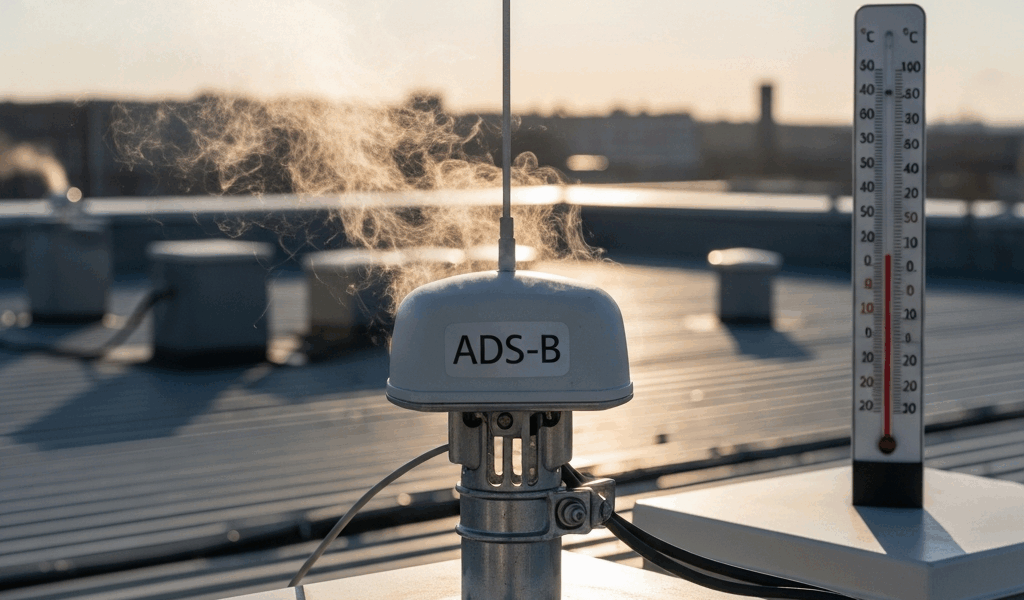
Frustrated by unexplained summer dropouts last July, I stuck a cheap thermometer probe inside my outdoor enclosure — a small black plastic project box, roughly 4×3 inches, sitting on a south-facing roof section. Outside air was 38°C. Inside the box: 62°C. The RTL2832U inside started showing visible noise figure creep around the 50°C mark. By 62°C, my signal waterfall looked noticeably worse. That was with zero direct hardware failure — just heat.
Dark enclosures absorb heat aggressively. Metal boxes with poor ventilation trap it. The gain slider in dump1090 or PiAware still reads the same number — the software has no idea the dongle is cooking — but actual sensitivity has dropped. Weak signals disappear. Range contracts. The software lies to you, basically.
Step-by-Step Fixes Ranked by How Much They Help
1. Shade or ventilate your receiver enclosure
This single fix recovered 40–50 aircraft in my daily count and pushed my range rings out by 10–15 miles. Move the dongle out of direct sunlight. If outdoor mounting is unavoidable, swap the black plastic box for a white PVC enclosure — around $8–12 at most hardware stores — and line the exterior with adhesive-backed reflective aluminum tape. Drill ventilation holes on opposite sides near the top and bottom edges to create airflow. A realistic temperature drop of 10–15°C inside the enclosure is achievable in an afternoon of work. Worth every minute.
2. Reduce gain manually to avoid ADC saturation
Strong nearby aircraft signals can overload the analog-to-digital converter — especially when atmospheric ducting amplifies local traffic. In dump1090, drop the gain by 3–5 dB on hot days. Watch your message rate over the next few hours. If it stays flat or actually climbs, the gain cut worked. You’ve reduced noise floor elevation caused by strong-signal saturation. Very distant weak signals might dip slightly, but overall range often improves because you’re no longer drowning out mid-range aircraft with close-in noise.
3. Inspect and reseal coax connectors
Heat cycling — warm days, cool nights, repeat — causes expansion and contraction at every connector junction. Moisture finds gaps. Oxidation builds up quietly. White or greenish deposits on the SMA or MCX pins mean corrosion-driven signal loss. Pull your antenna coax, inspect it visually, clean with 91% isopropyl alcohol and a small brush, apply a thin coat of silicone dielectric grease, and reseat everything firmly. Moisture ingress isn’t the dominant summer loss factor, but it’s cumulative. A few extra dB of cable loss compounds across hundreds of miles of propagation path.
4. Add or upgrade your LNA with a filter
A filtered LNA might be the best option, as ADS-B reception requires low noise figure at the antenna feed point. That is because every dB of loss before amplification directly reduces how far out you can see weak signals. If you don’t have one yet, a SAWbird+ 1090 runs around $34–40 and recovers meaningful performance gains. If you already have an LNA, check the operating temperature spec — some budget units are only rated to 50°C. Replace anything below 70°C rated. A filtered unit also rejects out-of-band interference that worsens under summer atmospheric ducting conditions. One purchase, years of impact.
When It Is the Atmosphere and You Cannot Fix It
Some summer range loss is pure physics. You cannot fix it — and accepting that matters.
On certain hot, humid days with strong thermal inversions, the atmosphere creates ducting conditions. Radio waves bend sharply, producing strange dead zones mixed with unexpectedly extended range in specific directions. Your northeast coverage might triple while your southern quadrant goes nearly silent. This is real, it’s temporary, and it has nothing to do with your antenna or your dongle. It’s the sky doing something weird.
The benchmark that actually matters is consistency over days, not single-day variance. Tools like tar1090 let you plot range statistics over time — compare your weekly average during a hot July week against a clear March week, both on VFR days with similar traffic. If your hardware fixes worked, July should track closer to March than it used to.
Don’t compare your numbers to your neighbor’s setup or an online leaderboard. Every installation has a unique antenna orientation, local RF environment, and noise floor. Your winter baseline performance is your real benchmark — nothing else.
Summer range drop is a three-part problem: atmospheric refraction, hardware thermal effects, and cumulative small losses stacking against you. Fix the hardware first — that’s what you actually control. Accept the atmospheric limits for what they are.



Stay in the loop
Get the latest aerodata updates delivered to your inbox.